First Communion Card with Cross Cut File
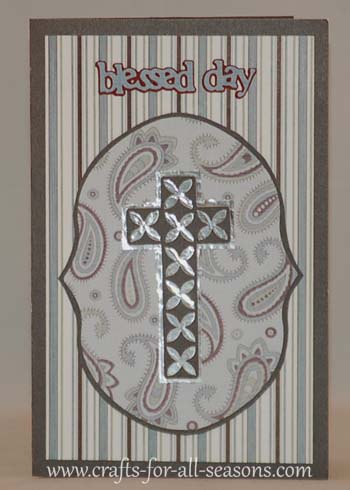
This First Communion card can also be
given as a baptism
card, or a confirmation card, a wedding, or any special day for someone dear.
The card size is 8.5" x 5.5" (half fold card) and the project instructions include a Cricut Design Studio cut file for the cross using the Accent Essentials cartridge. The other cartridge used is Stamping Solutions.
Read on to find all the cut sizes.
Things Needed to Make this Card:
- Stamping Solution Cartridge for the frame and the words "blessed day"
- Accent Essentials Cartridge and Design Studio Software for the cross cut file.
- 8.5" x 11" cardstock for card base
- Patterned paper for the background on front and inside of card
- Solid paper the frame shadow, the cross, and the words "blessed day"
- Foil paper for the background of the cross.
Quick
Summary for the card:
- Card is 8.5" x 5.5" (half fold card)
Stamping Solutions:
- Scallop frame for the front was cut at 6"
- "Blessed Day" was cut at 1.25"
Accent Essentials:
- Cut file is included. The cross is about 4" x 2.5".
Detailed Instructions for Making the First Communion Card
1. Fold a 8.5" x 11" piece of
cardstock
in half to create a 5.5" x 8.5" card. This will be the card
base.
2. Using the Stamping Solutions
cartridge, select "blackout", (button 45). Cut at size 6".
Then you can load a contrasting sheet of paper for the shadow
and select "shadow" and "repeat last". Cut at the same size
(6").
3. Load a solid piece of
paper for "blessed day" and select button 30, cand cut at size 1.25".
You can also create a shadow for the words by loading a
contrasting sheet of paper, then select "shadow", "repeat last" and
"cut".
4.
Click here for the Cricut Design Studio cross cut file.
You will need to unzip the file, and you must have the Accent
Essentials cartridge to cut this. The cross ends up at 4" x
2.5". I then glued the cross on a foil paper background and
hand cut a shadow behind it.
5.
Glue all the components on the front of the card.
The inside of the card is ready for the verse of your choice.
It can be handwritten or printed on your computer in a 5" x
10" square.
Would you consider a small donation?
You will receive my craft ebook as a thank you!
Every little bit helps! If you are enjoying this site, would you consider making a small donation? I use the extra money to help with the cost of craft supplies! With any $5.00 donation or more, you will receive my 650 page ebook full of 178 craft tutorials from this site. Thank you for your consideration!
Click here to learn more about the book, and to make a donation.
Like this Site? Please share the Love!
You can follow me here:



I invite you to subscribe to
The Creative Crafter
The Creative Crafter is my quarterly newsletter that is emailed four times per year. It lets you know about any new additions to the site. As a bonus, you will get a new craft project in your email that only subscribers get to see.
Facebook Comments
Have Your Say About What You Just Read! Leave Your Comments or Questions Below.