Cricut Wedding Card
Storybook Wedding Card
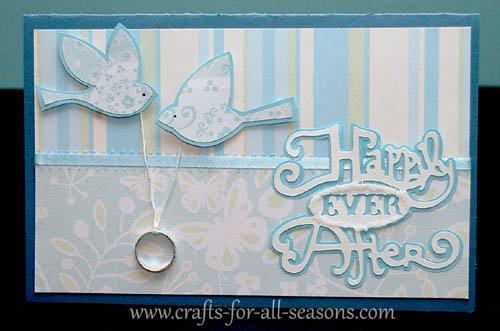
This Cricut wedding card was made using the Storybook cartridge and Lyrical Letters cartridge.
I also added a little metal wedding ring. You can buy these in multi-packs by the wedding favors in party stores and craft stores. I always like to have some on hand because they are inexpensive and make great embellishments for wedding shower cards, wedding cards, or anniversary cards. This card measures 8.5" x 5.5" (half fold card). Read on to find all the cut sizes.
Things Needed to Make this Cricut Wedding Card:
- Glue dots or another strong adhesive
- Glue stick or pen (for intricate designs I use a fine-tipped Zig pen)
- Paper trimmer and or scissors
- Embroidery floss or thin ribbon to hold the ring
- Ribbon
- Metal wedding ring
- Glitter (optional)
- Solid paper words and shadows (I used light blue and white)
- Two or three coordinating patterned papers for the background and the doves
- 8.5" x 11" solid color cardstock for card base
- Lyrical Letter Cartridge (for the doves)
- (for "Happily Ever After")Storybook Cartridge
Quick Summary for the Cricut Wedding Card:
- Card is 8.5" x 5.5" (half fold card)
- Inside patterned mat is cut to 8" x 5"
- Bottom patterned paper is cut to 8" x 2.5"
- Ribbon was cut to 9" long and taped behind the inside mat
Storybook cut sizes:
- "Happily Ever After" was cut at 3"
Lyrical Letters cut sizes:
- Doves were cut at 3.75"
Detailed Instructions for Cricut Wedding Card:
1. Fold a 8.5" x 11" piece of cardstock in half to create a 5.5" x 8.5" card. This will be the card base.
2. Cut a patterned piece of paper to 8" x 5". Thsi will be the inside mat.
3. Cut another coordinating piece of paper to 8" x 2.5". Glue this to the bottom half of the inside mat, flush with the bottom edge.
4. Cut a length of ribbon to 9". Glue it down the center of the card, lengthwise, to cover the seams where the two patterened papers meet. Tape the ends behind the mat. Then, glue this entire mat to the front of the card base.
5. Load the Storybook cartridge into your Cricut machine. Load a solid piece of cardstock for the words "Happily Ever After" (I used white). To cut the words, press button 42. Select a size of 3 inches. Press "cut". When it is finished, load a piece of cardstock you would like to be the shadow of these words (I used light blue). Then press the "repeat last" button (or press button 42 once again) and select the "shadow" button. Keep the size at 3". Press "cut". When both pieces are cut, use a fine tipped zig glue pen to adhere the words on top of its shadow. Optional: apply a thin line of glue in a circle around the words "ever" and apply glitter. Shake off the excess and allow it to dry. If you do this part, add the glitter and allow it to dry before you glue the words to its shadow.
6. To cut the doves, load the Lyrical Letters Cartridge into your Cricut machine. Load in a piece of cardstock or patterned paper. Press the "Shift" button, then select the button that says "Spring" (button 45). Then press the special feature button "Italic Monoline". Be sure you see the doves on the screen before you cut. Choose cut size 3.75". Press "cut". Note: There is no shadow feature for the doves on the cartridge. I made my shadows by gluing the doves on contrasting cardstock, and then cutting around them by hand to create my own shadow.
7. Tie a small length of embroidery floss or pretty string around the metal ring. Spread the ends of the string apart and attach them to your card using a glue dot or another strong glue. Then, glue the doves over the string. I used cut squares of foamie sheets underneath my doves to give them dimension and have them stand off the card a bit.
5. Glue the words "Happily Ever After" to the front of the card as shown.
Would you consider a small donation?
You will receive my craft ebook as a thank you!
Every little bit helps! If you are enjoying this site, would you consider making a small donation? I use the extra money to help with the cost of craft supplies! With any $5.00 donation or more, you will receive my 650 page ebook full of 178 craft tutorials from this site. Thank you for your consideration!
Click here to learn more about the book, and to make a donation.
Like this Site? Please share the Love!
You can follow me here:



I invite you to subscribe to
The Creative Crafter
The Creative Crafter is my quarterly newsletter that is emailed four times per year. It lets you know about any new additions to the site. As a bonus, you will get a new craft project in your email that only subscribers get to see.
Facebook Comments
Have Your Say About What You Just Read! Leave Your Comments or Questions Below.